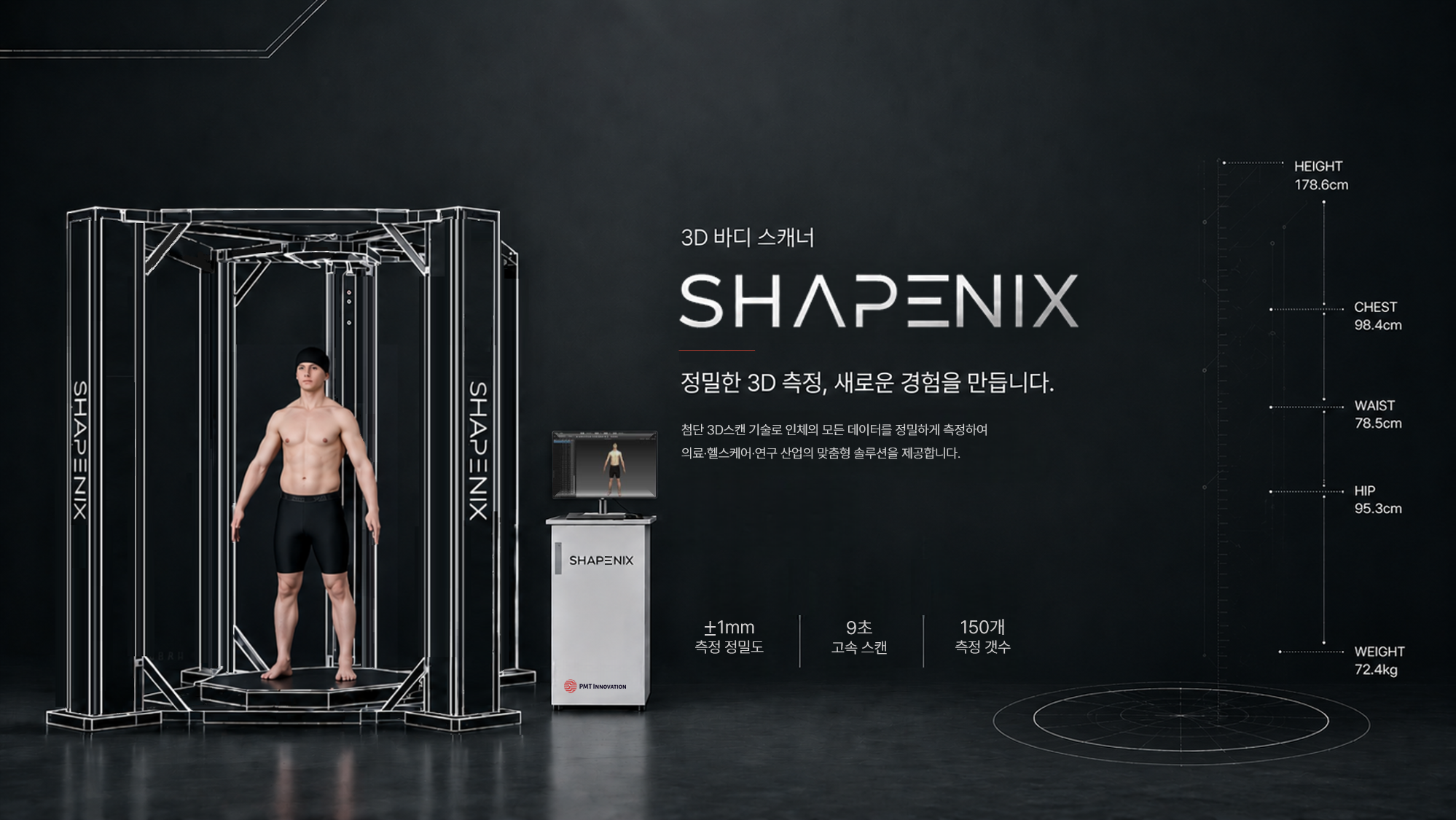
/* HomePage.jsx — Hero, Stats, Features, Industries, Partners, CTA */

/* ── 모듈 변수: F5 새로고침 시 초기화, SPA 이동 시 유지 ── */
let _heroPlayed = false;

/* ── STL 모델 프리페치: 영상 재생 중 미리 다운로드해서 영상 종료 후 대기시간 단축 ── */
let _stlFetchPromise = null;
function prefetchSTL() {
  if (!_stlFetchPromise) {
    _stlFetchPromise = fetch('assets/' + encodeURIComponent('모델.stl'))
      .then(r => { if (!r.ok) throw new Error('fetch failed ' + r.status); return r.arrayBuffer(); });
  }
  return _stlFetchPromise;
}

/* ── 반응형 너비 훅 ── */
function useWindowWidth() {
  const [w, setW] = React.useState(window.innerWidth);
  React.useEffect(() => {
    const h = () => setW(window.innerWidth);
    window.addEventListener('resize', h);
    return () => window.removeEventListener('resize', h);
  }, []);
  return w;
}

/* ── Scroll Animation Hook ── */
function useScrollReveal(threshold = 0.15, rootMargin = '0px') {
  const ref = React.useRef(null);
  const [visible, setVisible] = React.useState(false);
  React.useEffect(() => {
    const el = ref.current;
    if (!el) return;
    const obs = new IntersectionObserver(([e]) => {if (e.isIntersecting) {setVisible(true);obs.disconnect();}}, { threshold, rootMargin });
    obs.observe(el);
    return () => obs.disconnect();
  }, []);
  return [ref, visible];
}

/* ── Animated Counter ── */
function Counter({ target, suffix = '', duration = 1800 }) {
  const [val, setVal] = React.useState(0);
  const [ref, visible] = useScrollReveal(0.5);
  React.useEffect(() => {
    if (!visible) return;
    const isNum = /^\d+$/.test(String(target));
    if (!isNum) {setVal(target);return;}
    const num = parseInt(target);
    let start = 0;const step = num / (duration / 16);
    const tick = () => {start = Math.min(start + step, num);setVal(Math.floor(start));if (start < num) requestAnimationFrame(tick);};
    requestAnimationFrame(tick);
  }, [visible, target]);
  return <span ref={ref}>{val}{suffix}</span>;
}

/* ══════════════════════════════════════════
   STL MODEL VIEWER — fetch + 내장 파서
══════════════════════════════════════════ */
function STLModelViewer() {
  const mountRef = React.useRef(null);

  React.useEffect(() => {
    const el = mountRef.current;
    if (!el || !window.THREE) return;
    const T = window.THREE;
    const W = el.clientWidth || 600;
    const H = el.clientHeight || 700;

    /* ── Renderer (투명 배경 — 히어로 bg 비침) ── */
    const renderer = new T.WebGLRenderer({ antialias: true, alpha: true });
    renderer.setSize(W, H);
    renderer.setPixelRatio(Math.min(window.devicePixelRatio, 2));
    renderer.setClearColor(0x000000, 0);
    el.appendChild(renderer.domElement);
    Object.assign(renderer.domElement.style, {
      position: 'absolute', inset: '0', width: '100%', height: '100%',
    });

    /* ── Scene (배경 없음 → 투명) ── */
    const scene = new T.Scene();

    /* ── Camera ── */
    const cam = new T.PerspectiveCamera(40, W / H, 0.1, 1000);
    cam.position.set(0, 0, 9);

    /* ── 중립 흰색 조명 (회색 모델용) ── */
    scene.add(new T.AmbientLight(0xffffff, 2.0));

    const key = new T.DirectionalLight(0xffffff, 4.0);
    key.position.set(3, 8, 6);
    scene.add(key);

    const fill = new T.DirectionalLight(0xdddddd, 2.0);
    fill.position.set(-5, 1, 4);
    scene.add(fill);

    const top = new T.DirectionalLight(0xffffff, 1.8);
    top.position.set(0, 12, 2);
    scene.add(top);

    const bluePt = new T.PointLight(0xffffff, 3.0, 22);
    bluePt.position.set(-2, 2, 5);
    scene.add(bluePt);

    const cyanPt = new T.PointLight(0xeeeeee, 2.0, 18);
    cyanPt.position.set(3, -1, 4);
    scene.add(cyanPt);

    /* ── Binary STL 파서 ── */
    function parseBinarySTL(buf) {
      const view = new DataView(buf);
      const numTri = view.getUint32(80, true);
      const pos = new Float32Array(numTri * 9);
      const nor = new Float32Array(numTri * 9);
      let off = 84;
      for (let i = 0; i < numTri; i++) {
        const nx = view.getFloat32(off, true);
        const ny = view.getFloat32(off + 4, true);
        const nz = view.getFloat32(off + 8, true);
        off += 12;
        for (let v = 0; v < 3; v++) {
          const idx = i * 9 + v * 3;
          pos[idx]     = view.getFloat32(off, true);
          pos[idx + 1] = view.getFloat32(off + 4, true);
          pos[idx + 2] = view.getFloat32(off + 8, true);
          nor[idx] = nx; nor[idx + 1] = ny; nor[idx + 2] = nz;
          off += 12;
        }
        off += 2;
      }
      const geo = new T.BufferGeometry();
      geo.setAttribute('position', new T.BufferAttribute(pos, 3));
      geo.setAttribute('normal',   new T.BufferAttribute(nor, 3));
      return geo;
    }

    /* ── ASCII STL 파서 (fallback) ── */
    function parseASCIISTL(text) {
      const pos = [], nor = [];
      const lines = text.split('\n');
      let nx = 0, ny = 0, nz = 0;
      for (const line of lines) {
        const l = line.trim();
        if (l.startsWith('facet normal')) {
          const p = l.split(/\s+/);
          nx = parseFloat(p[2]); ny = parseFloat(p[3]); nz = parseFloat(p[4]);
        } else if (l.startsWith('vertex')) {
          const p = l.split(/\s+/);
          pos.push(parseFloat(p[1]), parseFloat(p[2]), parseFloat(p[3]));
          nor.push(nx, ny, nz);
        }
      }
      const geo = new T.BufferGeometry();
      geo.setAttribute('position', new T.BufferAttribute(new Float32Array(pos), 3));
      geo.setAttribute('normal',   new T.BufferAttribute(new Float32Array(nor), 3));
      return geo;
    }

    let model = null;
    let scanPlane = null, scanMat = null;
    let destroyed = false;

    /* ── STL 로드 (영상 재생 중 프리페치된 데이터 재사용) ── */
    prefetchSTL()
      .then(buf => {
        if (destroyed) return;

        /* binary vs ascii 판별 */
        const view = new DataView(buf);
        const numTri = view.getUint32(80, true);
        const expectedBinary = 84 + numTri * 50;
        const isBinary = Math.abs(buf.byteLength - expectedBinary) < 20 && numTri > 0;

        let geo;
        if (isBinary) {
          geo = parseBinarySTL(buf);
        } else {
          geo = parseASCIISTL(new TextDecoder().decode(buf));
        }

        geo.computeVertexNormals();
        geo.center();

        /* 크기 자동 맞춤 */
        const box3 = new T.Box3().setFromBufferAttribute(geo.attributes.position);
        const sz = new T.Vector3();
        box3.getSize(sz);
        const maxDim = Math.max(sz.x, sz.y, sz.z);
        const scale = 4.8 / maxDim;

        /* 솔리드 회색 재질 */
        const mat = new T.MeshStandardMaterial({
          color: 0xaaaaaa,
          roughness: 0.55,
          metalness: 0.15,
        });

        model = new T.Mesh(geo, mat);
        model.scale.setScalar(scale * 1.05);
        scene.add(model);
      })
      .catch(err => console.error('STL 로드 실패:', err));

    /* ── 인터랙션 ── */
    let drag = false, rotX = 0, rotY = 0.3, velX = 0, velY = 0.003;
    let px0 = 0, py0 = 0;

    const onDown = (e) => {
      drag = true; velX = 0; velY = 0;
      const c = e.touches ? e.touches[0] : e;
      px0 = c.clientX; py0 = c.clientY;
      renderer.domElement.style.cursor = 'grabbing';
    };
    const onMove = (e) => {
      if (!drag) return;
      const c = e.touches ? e.touches[0] : e;
      velY = (c.clientX - px0) * 0.009;
      velX = (c.clientY - py0) * 0.006;
      rotY += velY; rotX += velX;
      rotX = Math.max(-0.55, Math.min(0.55, rotX));
      px0 = c.clientX; py0 = c.clientY;
    };
    const onUp = () => { drag = false; renderer.domElement.style.cursor = 'grab'; };

    renderer.domElement.style.cursor = 'grab';
    renderer.domElement.addEventListener('mousedown', onDown);
    window.addEventListener('mousemove', onMove);
    window.addEventListener('mouseup', onUp);
    renderer.domElement.addEventListener('touchstart', onDown, { passive: true });
    window.addEventListener('touchmove', onMove, { passive: true });
    window.addEventListener('touchend', onUp);

    /* ── 애니메이션 ── */
    let t = 0, raf;
    const animate = () => {
      raf = requestAnimationFrame(animate);
      t += 0.016;
      if (!drag) {
        velY += (0.003 - velY) * 0.04;
        velX *= 0.93;
        rotY += velY;
        rotX += velX;
        rotX = Math.max(-0.4, Math.min(0.4, rotX));
      }
      if (model) { model.rotation.y = rotY; model.rotation.x = rotX; }
      /* Blue glow pulse */
      bluePt.intensity = 4.8 + Math.sin(t * 2.2) * 1.6;
      cyanPt.intensity = 2.5 + Math.sin(t * 3.1) * 1.0;
      /* Scan plane sweep */
      if (scanPlane && scanMat) {
        scanPlane.position.y = Math.sin(t * 0.75) * 3.2;
        scanMat.opacity = 0.2 + Math.sin(t * 4) * 0.1;
      }
      renderer.render(scene, cam);
    };
    animate();

    const onResize = () => {
      const w = el.clientWidth, h = el.clientHeight;
      if (!w || !h) return;
      cam.aspect = w / h; cam.updateProjectionMatrix();
      renderer.setSize(w, h);
    };
    window.addEventListener('resize', onResize);

    return () => {
      destroyed = true;
      cancelAnimationFrame(raf);
      window.removeEventListener('resize', onResize);
      window.removeEventListener('mousemove', onMove);
      window.removeEventListener('mouseup', onUp);
      window.removeEventListener('touchmove', onMove);
      window.removeEventListener('touchend', onUp);
      renderer.dispose();
      if (el.contains(renderer.domElement)) el.removeChild(renderer.domElement);
    };
  }, []);

  return (
    <div ref={mountRef} style={{ position: 'absolute', inset: 0, width: '100%', height: '100%', overflow: 'visible' }} />
  );
}

/* ══════════════════════════════════════════
   THREE.JS SCANNER — SHAPENIX 3D MODEL
══════════════════════════════════════════ */
function ScannerCanvas() {
  const mountRef = React.useRef(null);

  React.useEffect(() => {
    const el = mountRef.current;
    if (!el || !window.THREE) return;
    const T = window.THREE;
    const W = el.clientWidth || 500;
    const H = el.clientHeight || 600;

    /* Renderer — solid dark bg so objects are always visible */
    const renderer = new T.WebGLRenderer({ antialias: true, alpha: false });
    renderer.setSize(W, H);
    renderer.setPixelRatio(Math.min(window.devicePixelRatio, 2));
    renderer.setClearColor(0x08090e, 1);
    el.appendChild(renderer.domElement);
    Object.assign(renderer.domElement.style, {
      position: 'absolute', inset: '0', width: '100%', height: '100%'
    });

    /* Scene */
    const scene = new T.Scene();
    scene.background = new T.Color(0x08090e);
    scene.fog = new T.Fog(0x08090e, 14, 22);

    /* Camera */
    const cam = new T.PerspectiveCamera(40, W / H, 0.1, 100);
    cam.position.set(0, 0.5, 6.5);

    /* ── Lights ── */
    scene.add(new T.AmbientLight(0xffffff, 1.8));
    const key = new T.DirectionalLight(0xffffff, 3.5);
    key.position.set(5, 8, 6);
    scene.add(key);
    const fill = new T.DirectionalLight(0x88aaff, 1.5);
    fill.position.set(-5, 2, 4);
    scene.add(fill);
    const top = new T.DirectionalLight(0xffffff, 2.0);
    top.position.set(0, 10, 0);
    scene.add(top);
    const red = new T.PointLight(0xff3311, 5.0, 12);
    red.position.set(0, -1, 3);
    scene.add(red);
    const back = new T.DirectionalLight(0x4466ff, 0.8);
    back.position.set(0, 2, -6);
    scene.add(back);

    /* ── Materials ── */
    const SILVER = new T.MeshStandardMaterial({ color: 0x8888a0, metalness: 0.8, roughness: 0.25 });
    const DARK = new T.MeshStandardMaterial({ color: 0x444455, metalness: 0.7, roughness: 0.3 });
    const BASE = new T.MeshStandardMaterial({ color: 0x333344, metalness: 0.6, roughness: 0.4 });
    const GLOW = new T.MeshBasicMaterial({ color: 0xC8271D });

    /* ── Build scanner group ── */
    const grp = new T.Group();
    scene.add(grp);

    function box(w, h, d, mat, x, y, z) {
      const m = new T.Mesh(new T.BoxGeometry(w, h, d), mat);
      m.position.set(x, y, z);
      grp.add(m);return m;
    }

    const px = 1.1,pz = 1.1,pH = 4.6;
    const botY = -pH / 2,topY = pH / 2;

    /* 4 pillars */
    [[-px, -pz], [px, -pz], [-px, pz], [px, pz]].forEach(([x, z]) => {
      box(0.17, pH, 0.17, SILVER, x, 0, z);
      /* inner highlight strip */
      const sx = x > 0 ? -0.05 : 0.05;
      const sz = z > 0 ? -0.05 : 0.05;
      box(0.05, pH, 0.05, DARK, x + sx, 0, z + sz);
    });

    /* Top frame */
    box(2.2 + 0.17, 0.17, 0.17, SILVER, 0, topY, pz);
    box(2.2 + 0.17, 0.17, 0.17, SILVER, 0, topY, -pz);
    box(0.17, 0.17, 2.2 + 0.17, SILVER, px, topY, 0);
    box(0.17, 0.17, 2.2 + 0.17, SILVER, -px, topY, 0);
    /* top cap */
    box(2.4, 0.05, 2.4, DARK, 0, topY + 0.11, 0);

    /* Mid camera rail */
    box(2.2, 0.09, 0.09, DARK, 0, 0.7, pz);
    box(2.2, 0.09, 0.09, DARK, 0, 0.7, -pz);
    box(0.09, 0.09, 2.2, DARK, px, 0.7, 0);
    box(0.09, 0.09, 2.2, DARK, -px, 0.7, 0);
    /* camera carriage */
    const carriage = box(0.22, 0.22, 0.22, GLOW, px, 0.7, 0);

    /* Bottom frame */
    box(2.2 + 0.17, 0.17, 0.17, SILVER, 0, botY, pz);
    box(2.2 + 0.17, 0.17, 0.17, SILVER, 0, botY, -pz);
    box(0.17, 0.17, 2.2 + 0.17, SILVER, px, botY, 0);
    box(0.17, 0.17, 2.2 + 0.17, SILVER, -px, botY, 0);

    /* Platform */
    const platGeo = new T.CylinderGeometry(1.48, 1.58, 0.12, 8);
    const plat = new T.Mesh(platGeo, BASE);
    plat.position.set(0, botY - 0.12, 0);
    grp.add(plat);

    /* Platform glow ring */
    const ring = new T.Mesh(new T.TorusGeometry(1.42, 0.022, 8, 48), GLOW);
    ring.rotation.x = Math.PI / 2;
    ring.position.set(0, botY - 0.07, 0);
    grp.add(ring);

    /* ── Human figure ── */
    const hGrp = new T.Group();
    hGrp.position.set(0, botY + 0.12, 0);
    grp.add(hGrp);

    const SKIN = new T.MeshStandardMaterial({ color: 0xd4a07a, roughness: 0.6 });
    const CLOTH = new T.MeshStandardMaterial({ color: 0x1c2440, roughness: 0.7 });

    // Head
    const hd = new T.Mesh(new T.SphereGeometry(0.21, 14, 14), SKIN);
    hd.position.set(0, 2.0, 0);hGrp.add(hd);
    // Neck
    const nk = new T.Mesh(new T.CylinderGeometry(0.09, 0.11, 0.21, 10), SKIN);
    nk.position.set(0, 1.77, 0);hGrp.add(nk);
    // Torso
    const ts = new T.Mesh(new T.BoxGeometry(0.58, 0.86, 0.26), SKIN);
    ts.position.set(0, 1.26, 0);hGrp.add(ts);
    // Shorts
    const sh = new T.Mesh(new T.BoxGeometry(0.62, 0.38, 0.28), CLOTH);
    sh.position.set(0, 0.73, 0);hGrp.add(sh);
    // Arms
    [-0.40, 0.40].forEach((x, i) => {
      const arm = new T.Mesh(new T.CylinderGeometry(0.085, 0.075, 0.85, 10), SKIN);
      arm.position.set(x, 1.18, 0.03);
      arm.rotation.z = i === 0 ? 0.22 : -0.22;
      hGrp.add(arm);
    });
    // Legs
    [-0.17, 0.17].forEach((x) => {
      const upper = new T.Mesh(new T.CylinderGeometry(0.115, 0.10, 0.98, 10), SKIN);
      upper.position.set(x, 0.22, 0);hGrp.add(upper);
      const lower = new T.Mesh(new T.CylinderGeometry(0.095, 0.078, 0.82, 10), SKIN);
      lower.position.set(x, -0.58, 0);hGrp.add(lower);
    });

    /* ── Scan plane ── */
    const scanMat = new T.MeshBasicMaterial({ color: 0xff2200, transparent: true, opacity: 0.9, side: T.DoubleSide });
    const scan = new T.Mesh(new T.PlaneGeometry(2.15, 0.010), scanMat);
    scan.rotation.x = Math.PI / 2;
    grp.add(scan);

    const haloMat = new T.MeshBasicMaterial({ color: 0xff2200, transparent: true, opacity: 0.12, side: T.DoubleSide });
    const halo = new T.Mesh(new T.PlaneGeometry(2.3, 0.20), haloMat);
    halo.rotation.x = Math.PI / 2;
    grp.add(halo);

    /* ── Scan dots ── */
    const dotGeo = new T.BufferGeometry();
    const dCount = 200;
    const dPos = new Float32Array(dCount * 3);
    for (let i = 0; i < dCount; i++) {
      const a = Math.random() * Math.PI * 2;
      const r = Math.random() * 0.95 + 0.08;
      dPos[i * 3] = Math.cos(a) * r;
      dPos[i * 3 + 1] = 0;
      dPos[i * 3 + 2] = Math.sin(a) * r * 0.28;
    }
    dotGeo.setAttribute('position', new T.BufferAttribute(dPos, 3));
    const dotMat = new T.PointsMaterial({ color: 0xff3300, size: 0.04, transparent: true, opacity: 0.9 });
    const dotCloud = new T.Points(dotGeo, dotMat);
    grp.add(dotCloud);

    /* ── Corner LEDs ── */
    [[px, topY - 0.06, pz], [px, topY - 0.06, -pz], [-px, topY - 0.06, pz], [-px, topY - 0.06, -pz]].forEach(([x, y, z]) => {
      const led = new T.Mesh(new T.SphereGeometry(0.045, 8, 8), GLOW);
      led.position.set(x, y, z);
      grp.add(led);
    });

    /* ── Floor grid ── */
    const grid = new T.GridHelper(10, 20, 0x1a1a2e, 0x151520);
    grid.position.y = botY - 0.18;
    scene.add(grid);

    /* ── Interaction ── */
    let drag = false,rotX = -0.1,rotY = 0.45,velX = 0,velY = 0.003;
    let px0 = 0,py0 = 0;

    const down = (e) => {
      drag = true;velX = 0;velY = 0;
      const c = e.touches ? e.touches[0] : e;
      px0 = c.clientX;py0 = c.clientY;
      renderer.domElement.style.cursor = 'grabbing';
    };
    const move = (e) => {
      if (!drag) return;
      const c = e.touches ? e.touches[0] : e;
      velY = (c.clientX - px0) * 0.009;
      velX = (c.clientY - py0) * 0.006;
      rotY += velY;rotX += velX;
      rotX = Math.max(-0.5, Math.min(0.5, rotX));
      px0 = c.clientX;py0 = c.clientY;
    };
    const up = () => {drag = false;renderer.domElement.style.cursor = 'grab';};

    renderer.domElement.style.cursor = 'grab';
    renderer.domElement.addEventListener('mousedown', down);
    window.addEventListener('mousemove', move);
    window.addEventListener('mouseup', up);
    renderer.domElement.addEventListener('touchstart', down, { passive: true });
    window.addEventListener('touchmove', move, { passive: true });
    window.addEventListener('touchend', up);

    /* ── Animate ── */
    let t = 0,raf;
    const animate = () => {
      raf = requestAnimationFrame(animate);
      t += 0.016;
      if (!drag) {
        velY += (0.003 - velY) * 0.04;
        velX *= 0.94;
        rotY += velY;rotX += velX;
        rotX = Math.max(-0.35, Math.min(0.35, rotX));
      }
      grp.rotation.y = rotY;
      grp.rotation.x = rotX;

      // scan line
      const sy = Math.sin(t * 0.85) * 1.85;
      scan.position.y = sy;
      halo.position.y = sy;
      dotCloud.position.y = sy;
      scanMat.opacity = 0.7 + Math.sin(t * 4) * 0.2;
      haloMat.opacity = 0.08 + Math.sin(t * 4) * 0.06;
      dotMat.opacity = 0.6 + Math.sin(t * 3) * 0.3;

      // pulse
      red.intensity = 3.5 + Math.sin(t * 6) * 1.5;
      ring.material.opacity !== undefined && (ring.material.opacity = 0.6 + Math.sin(t * 3) * 0.3);

      renderer.render(scene, cam);
    };
    animate();

    const resize = () => {
      const w = el.clientWidth,h = el.clientHeight;
      if (!w || !h) return;
      cam.aspect = w / h;cam.updateProjectionMatrix();
      renderer.setSize(w, h);
    };
    window.addEventListener('resize', resize);

    return () => {
      cancelAnimationFrame(raf);
      window.removeEventListener('resize', resize);
      window.removeEventListener('mousemove', move);
      window.removeEventListener('mouseup', up);
      window.removeEventListener('touchmove', move);
      window.removeEventListener('touchend', up);
      renderer.dispose();
      if (el.contains(renderer.domElement)) el.removeChild(renderer.domElement);
    };
  }, []);

  return (
    <div ref={mountRef} style={{ position: 'absolute', inset: 0, width: '100%', height: '100%' }}>
      <div style={{ position: 'absolute', bottom: 20, left: '50%', transform: 'translateX(-50%)', display: 'flex', alignItems: 'center', gap: 8, pointerEvents: 'none', zIndex: 10 }}>
        <svg width="16" height="16" viewBox="0 0 16 16" fill="none"><path d="M8 2v12M2 8h12" stroke="rgba(200,39,29,0.6)" strokeWidth="1.5" strokeLinecap="round" /><circle cx="8" cy="8" r="5.5" stroke="rgba(200,39,29,0.25)" strokeWidth="1" /></svg>
        <span style={{ fontSize: 10, fontWeight: 600, color: 'rgba(255,255,255,0.3)', letterSpacing: '0.12em', textTransform: 'uppercase' }}>드래그로 회전</span>
      </div>
    </div>);

}

/* ── Hero Section ── */
function HeroSection({ navigate }) {
  const [playing,   setPlaying]   = React.useState(!_heroPlayed);
  const [showModel, setShowModel] = React.useState(_heroPlayed);
  const [videoFade, setVideoFade] = React.useState(false);
  const [fadeOut,   setFadeOut]   = React.useState(0);
  const w = useWindowWidth();
  const isMobile = w < 768;

  /* 이미지 프리로드 */
  React.useEffect(() => {
    const img = new Image();
    img.src = 'assets/최최최종.png';
  }, []);

  /* 3D 모델 프리로드 — 영상 재생 중 미리 다운로드 시작 */
  React.useEffect(() => {
    prefetchSTL().catch(() => {});
  }, []);

  /* 스크롤에 따라 히어로 살짝 페이드 */
  React.useEffect(() => {
    const onScroll = () => {
      const ratio = Math.min(1, window.scrollY / window.innerHeight);
      setFadeOut(ratio);
    };
    window.addEventListener('scroll', onScroll, { passive: true });
    return () => window.removeEventListener('scroll', onScroll);
  }, []);

  const handleVideoEnd = () => {
    _heroPlayed = true;
    setVideoFade(true);
    setShowModel(true);
    setTimeout(() => setPlaying(false), 700);
  };

  return (
    <section style={{ height: '100vh', overflow: 'hidden', position: 'fixed', top: 0, left: 0, right: 0, zIndex: 0, background: '#000' }}>

      {/* ── 배경 이미지 — 항상 DOM에 존재(프리로드) ── */}
      <img
        src="assets/홈페이지메인2.png"
        alt=""
        style={{
          position: 'absolute', inset: 0, width: '100%', height: '100%',
          objectFit: 'cover', display: 'block',
          opacity: showModel ? 1 : 0,
          transition: 'opacity 0.5s ease',
        }}
      />

      {/* ── 영상 ── */}
      {playing && (
        <video
          src="assets/최종.mp4"
          autoPlay muted playsInline
          onEnded={handleVideoEnd}
          style={{
            position: 'absolute', inset: 0,
            width: '100%', height: '100%', objectFit: 'cover', display: 'block',
            transform: 'translateZ(0)', willChange: 'transform, opacity',
            opacity: videoFade ? 0 : 1,
            transition: videoFade ? 'opacity 0.5s ease' : 'none',
            zIndex: 1,
          }}
        />
      )}


      {/* ── STL 모델 오버레이 ── */}
      {showModel && (
        <>
          {/* 글로우 */}
          <div style={{
            position: 'absolute', top: '50%', right: '18%',
            transform: 'translateY(-50%)',
            width: 560, height: 560, borderRadius: '50%',
            background: 'radial-gradient(circle, rgba(160,160,160,0.22) 0%, rgba(120,120,120,0.06) 50%, transparent 70%)',
            pointerEvents: 'none', filter: 'blur(60px)',
          }} />

          {/* 모델 컨테이너 */}
          <div style={{
            position: 'absolute',
            top: isMobile ? '28%' : '5%',
            right: isMobile ? '-18%' : '-6%',
            width: isMobile ? '116%' : '50%',
            height: isMobile ? '72%' : '100%',
          }}>
            <STLModelViewer />
          </div>

          {/* 드래그 힌트 */}
          <div style={{
            position: 'absolute', bottom: 36,
            right: isMobile ? '50%' : 'calc(22% - 118px)',
            transform: isMobile ? 'translateX(50%)' : 'none',
            display: 'flex', alignItems: 'center', gap: 10,
            zIndex: 25, pointerEvents: 'none',
            background: 'rgba(0,0,0,0.55)', backdropFilter: 'blur(14px)',
            border: '1px solid rgba(255,255,255,0.28)', borderRadius: 99,
            padding: '11px 22px',
            boxShadow: '0 4px 24px rgba(0,0,0,0.35), 0 0 0 1px rgba(74,144,232,0.12)',
            animation: 'dragHintPulse 2.2s ease-in-out infinite',
          }}>
            <svg width="16" height="16" viewBox="0 0 14 14" fill="none" style={{ animation: 'dragHintSpin 2.4s linear infinite' }}>
              <circle cx="7" cy="7" r="5.5" stroke="rgba(120,180,255,0.95)" strokeWidth="1.3" />
              <path d="M7 3.5v7M3.5 7h7" stroke="rgba(120,180,255,0.95)" strokeWidth="1.4" strokeLinecap="round" />
            </svg>
            <span style={{ fontSize: 11.5, fontWeight: 700, color: 'rgba(255,255,255,0.92)', letterSpacing: '0.15em', textTransform: 'uppercase', whiteSpace: 'nowrap' }}>드래그로 회전</span>
          </div>
        </>
      )}

      {/* 스크롤 페이드아웃 오버레이 */}
      <div style={{
        position: 'absolute', inset: 0, zIndex: 30, pointerEvents: 'none',
        background: `rgba(0,0,0,${fadeOut * 0.55})`,
      }} />
    </section>
  );
}
/* ── Features Carousel Section ── */
function ScrollCardsSection({ navigate, setSubPage }) {
  const w = useWindowWidth();
  const isMobile = w < 768;
  const [active, setActive] = React.useState(0);
  const [animKey, setAnimKey] = React.useState(0);
  const touchRef = React.useRef({ x: 0, y: 0 });

  const cards = [
    {
      tag: '도입 현황', idx: '01',
      title: '사용 목적에 맞는 스캐너와\n전문 솔루션 제공',
      body: '한 대의 바디스캐너로 다수의 사용자가 동시에 접속할 수 있는 네트워크 시스템을 지원합니다. 환자 상담은 물론 데이터베이스 기반 마케팅, 연구 및 논문 활용까지 가능하며, 성형·비만 클리닉, 한의원, 건강검진센터, 연구기관, 대학교, 의류 연구소 등 다양한 분야에서 활용되고 있습니다.',
      imgs: ['assets/대표사진/비만_2.jpg', 'assets/ui-overview.png', 'assets/ui-measurement.png'],
      stats: [{ num: '54+', label: '도입 기관' }, { num: '5+', label: '업종 분야' }, { num: '전국세계', label: '분포 지역' }],
      btn: '도입사례 보기', btnPage: 'cases',
    },
    {
      tag: '정밀 기술', idx: '02',
      title: '10초 스캔으로 150개 항목,\n오차 1mm',
      body: '마커 부착 없이 단 10초의 비접촉 스캔으로 150개 인체항목이 자동 측정됩니다. 1mm 이내 오차로 실제 신체와 동일한 수치를 제공하며, 측정자의 숙련도와 무관하게 언제나 일관된 결과를 보장합니다.',
      imgs: ['assets/기술사진.png', 'assets/ui-circumference.png', 'assets/screen-ba.png'],
      stats: [{ num: '10초', label: '스캔 완료' }, { num: '1mm', label: '측정 오차' }, { num: '150', label: '자동 측정 항목' }],
    },
    {
      tag: '자체 기술력', idx: '03',
      title: '적외선 라인스캔 × 자체 개발 기술',
      body: '하드웨어 설계, 3D 렌더링 엔진, 측정 알고리즘 — 모두 자체 개발입니다. SHAPENIX는 ISO 20685 국제 표준 기반 설계와 적외선 라인스캔 방식을 통해 높은 측정 신뢰도를 보장합니다.',
      imgs: ['assets/자체기술.png', 'assets/ui-posture.png', 'assets/screen-posture.png'],
      stats: [{ num: '100%', label: '자체 개발' }, { num: '4건', label: '기술 특허' }, { num: 'R&D', label: '전담 팀 운영' }],
      btn: '제품 상세 보기', btnPage: 'products', btnSubPage: 'SHAPENIX',
    },
  ];

  const blurBgs = ['assets/병원블러.png', 'assets/인체블러.png', 'assets/개발블러.png'];

  const goTo = (idx) => {
    if (idx === active) return;
    setActive(idx);
    setAnimKey(k => k + 1);
  };

  /* 모바일 스와이프 — 화살표 버튼이 없는 모바일 화면에서 좌우로 카드 전환 */
  const handleTouchStart = (e) => {
    const t = e.touches[0];
    touchRef.current = { x: t.clientX, y: t.clientY };
  };
  const handleTouchEnd = (e) => {
    const t = e.changedTouches[0];
    const dx = t.clientX - touchRef.current.x;
    const dy = t.clientY - touchRef.current.y;
    if (Math.abs(dx) < 40 || Math.abs(dx) < Math.abs(dy)) return; /* 세로 스크롤과 구분 */
    if (dx < 0) goTo((active + 1) % cards.length);
    else goTo((active - 1 + cards.length) % cards.length);
  };

  const card = cards[active];

  return (
    <div style={{
      position: 'relative', height: '100vh',
      display: 'flex', alignItems: 'center', justifyContent: 'center',
      overflow: 'hidden',
    }}>
      {/* 배경 — 카드에 따라 교체 */}
      {blurBgs.map((bg, i) => (
        <img key={i} src={bg} alt="" style={{
          position: 'absolute', inset: 0, width: '100%', height: '100%',
          objectFit: 'cover', zIndex: 0, pointerEvents: 'none',
          opacity: i === active ? 1 : 0,
          transition: 'opacity 500ms ease',
        }} />
      ))}
      {/* 밝기 오버레이 */}
      <div style={{ position: 'absolute', inset: 0, background: 'rgba(255,255,255,0.55)', zIndex: 1, pointerEvents: 'none' }} />

      {/* 카드 */}
      <div key={animKey}
        onTouchStart={isMobile ? handleTouchStart : undefined}
        onTouchEnd={isMobile ? handleTouchEnd : undefined}
        style={{
        width: isMobile ? 'calc(100% - 32px)' : '95%',
        maxWidth: 1440,
        height: isMobile ? 'auto' : '65vh',
        background: '#fff',
        borderRadius: 16,
        boxShadow: '0 8px 48px rgba(0,0,0,0.10), 0 1px 4px rgba(0,0,0,0.06)',
        overflow: 'hidden',
        display: 'flex',
        flexDirection: isMobile ? 'column' : 'row',
        position: 'relative',
        zIndex: 2,
        touchAction: isMobile ? 'pan-y' : undefined,
        animation: 'cardFadeIn 380ms cubic-bezier(0.16,1,0.3,1) both',
      }}>
        {/* 왼쪽: 텍스트 */}
        <div style={{
          flex: '0 0 55%',
          padding: isMobile ? '32px 24px 28px' : '52px 56px',
          display: 'flex', flexDirection: 'column', justifyContent: 'space-between',
        }}>
          <div>
            <div style={{ display: 'flex', alignItems: 'center', gap: 10, marginBottom: 24 }}>
              <span style={{ fontSize: 12, fontWeight: 800, color: '#C8271D', letterSpacing: '0.08em' }}>{card.idx}</span>
              <span style={{ fontSize: 11, fontWeight: 600, color: 'rgba(0,0,0,0.35)', letterSpacing: '0.12em', textTransform: 'uppercase' }}>{card.tag}</span>
            </div>
            <div style={{
              fontSize: isMobile ? 26 : 40,
              fontWeight: 600, color: '#1a1a1a',
              letterSpacing: '-0.04em', lineHeight: 1.2,
              whiteSpace: 'pre-line', marginBottom: 36,
            }}>{card.title}</div>
            <div style={{
              fontSize: isMobile ? 15 : 18,
              color: 'rgba(0,0,0,0.48)', lineHeight: 1.8,
              fontWeight: 500, maxWidth: 560, marginBottom: 9,
            }}>{card.body}</div>
            {card.btn && (
              <button onClick={() => { if (card.btnSubPage) setSubPage && setSubPage(card.btnSubPage); navigate(card.btnPage); }} style={{
                display: 'inline-flex', alignItems: 'center', gap: 8,
                background: 'none', border: '1px solid rgba(0,0,0,0.2)',
                borderRadius: 99, padding: '10px 22px',
                fontSize: 13, fontWeight: 700, color: '#1a1a1a',
                cursor: 'pointer', fontFamily: 'inherit',
                transition: 'border-color 200ms, background 200ms',
              }}
                onMouseEnter={e => { e.currentTarget.style.borderColor = '#C8271D'; e.currentTarget.style.background = 'rgba(200,39,29,0.06)'; }}
                onMouseLeave={e => { e.currentTarget.style.borderColor = 'rgba(0,0,0,0.2)'; e.currentTarget.style.background = 'none'; }}
              >
                {card.btn}
                <svg width="12" height="12" viewBox="0 0 12 12" fill="none">
                  <path d="M2.5 6h7M7 3l2.5 3L7 9" stroke="currentColor" strokeWidth="1.5" strokeLinecap="round" strokeLinejoin="round"/>
                </svg>
              </button>
            )}
          </div>
          {/* 통계 */}
          <div style={{ display: 'flex', borderTop: '1px solid rgba(0,0,0,0.07)', paddingTop: 24, marginTop: isMobile ? 24 : 0 }}>
            {card.stats.map((st, si) => (
              <div key={si} style={{
                flex: 1, paddingRight: si < 2 ? 20 : 0, marginRight: si < 2 ? 20 : 0,
                borderRight: si < 2 ? '1px solid rgba(0,0,0,0.08)' : 'none',
              }}>
                <div style={{ fontSize: isMobile ? 20 : 28, fontWeight: 500, color: '#1a1a1a', letterSpacing: '-0.04em', lineHeight: 1, marginBottom: 4 }}>{st.num}</div>
                <div style={{ fontSize: 10, fontWeight: 600, color: 'rgba(0,0,0,0.38)', letterSpacing: '0.04em' }}>{st.label}</div>
              </div>
            ))}
          </div>
        </div>

        {/* 오른쪽: 영상/이미지 */}
        <div style={{ flex: '0 0 45%', position: 'relative', overflow: 'hidden', minHeight: isMobile ? 200 : 'auto', zIndex: 2 }}>
          {active === 0
            ? <video key="video" src="assets/바꾸기2.mp4" autoPlay muted loop playsInline style={{ width: '100%', height: '100%', objectFit: 'cover', display: 'block' }} />
            : <img key={active} src={card.imgs[0]} alt={card.tag} style={{ width: '100%', height: '100%', objectFit: 'cover', display: 'block' }} />
          }
          <div style={{ position: 'absolute', inset: 0, background: 'linear-gradient(to right, #fff 0%, transparent 28%)' }} />
          <div style={{ position: 'absolute', inset: 0, background: 'linear-gradient(to top, #fff 0%, transparent 30%)' }} />
        </div>
      </div>

      {/* 좌우 화살표 버튼 */}
      {!isMobile && (
        <>
          <button onClick={() => goTo((active - 1 + cards.length) % cards.length)} style={{
            position: 'absolute', left: 24, top: '50%', transform: 'translateY(-50%)',
            width: 44, height: 44, borderRadius: '50%',
            background: 'rgba(255,255,255,0.9)', backdropFilter: 'blur(10px)',
            border: '1px solid rgba(0,0,0,0.12)', cursor: 'pointer',
            display: 'flex', alignItems: 'center', justifyContent: 'center',
            zIndex: 10, transition: 'all 200ms',
            boxShadow: '0 2px 12px rgba(0,0,0,0.10)',
          }}
            onMouseEnter={e => { e.currentTarget.style.background = '#C8271D'; e.currentTarget.style.borderColor = '#C8271D'; }}
            onMouseLeave={e => { e.currentTarget.style.background = 'rgba(255,255,255,0.9)'; e.currentTarget.style.borderColor = 'rgba(0,0,0,0.12)'; }}
          >
            <svg width="16" height="16" viewBox="0 0 16 16" fill="none">
              <path d="M10 3L5 8l5 5" stroke="currentColor" strokeWidth="1.8" strokeLinecap="round" strokeLinejoin="round"/>
            </svg>
          </button>
          <button onClick={() => goTo((active + 1) % cards.length)} style={{
            position: 'absolute', right: 24, top: '50%', transform: 'translateY(-50%)',
            width: 44, height: 44, borderRadius: '50%',
            background: 'rgba(255,255,255,0.9)', backdropFilter: 'blur(10px)',
            border: '1px solid rgba(0,0,0,0.12)', cursor: 'pointer',
            display: 'flex', alignItems: 'center', justifyContent: 'center',
            zIndex: 10, transition: 'all 200ms',
            boxShadow: '0 2px 12px rgba(0,0,0,0.10)',
          }}
            onMouseEnter={e => { e.currentTarget.style.background = '#C8271D'; e.currentTarget.style.borderColor = '#C8271D'; }}
            onMouseLeave={e => { e.currentTarget.style.background = 'rgba(255,255,255,0.9)'; e.currentTarget.style.borderColor = 'rgba(0,0,0,0.12)'; }}
          >
            <svg width="16" height="16" viewBox="0 0 16 16" fill="none">
              <path d="M6 3l5 5-5 5" stroke="currentColor" strokeWidth="1.8" strokeLinecap="round" strokeLinejoin="round"/>
            </svg>
          </button>
        </>
      )}

      {/* 모바일: 화살표 대신 점 인디케이터 (스와이프로도 전환 가능) */}
      {isMobile && (
        <div style={{
          position: 'absolute', bottom: 14, left: '50%', transform: 'translateX(-50%)',
          display: 'flex', gap: 8, zIndex: 10,
        }}>
          {cards.map((_, i) => (
            <button key={i} onClick={() => goTo(i)} style={{
              width: i === active ? 22 : 7, height: 7, borderRadius: 4,
              border: 'none', cursor: 'pointer', padding: 0, flexShrink: 0,
              background: i === active ? '#C8271D' : 'rgba(0,0,0,0.18)',
              transition: 'all 250ms cubic-bezier(0.16,1,0.3,1)',
            }} />
          ))}
        </div>
      )}
    </div>
  );
}

/* ══════════════════════════════════════════
   BENEFITS SECTION — Step 2
══════════════════════════════════════════ */
function BenefitsSection({ navigate }) {
  const [ref, visible] = useScrollReveal(0.1);
  const w = useWindowWidth();
  /* 440px 고정 sidebar + 530px 고정 영상박스가 있어 768px 기준으로 나누면
     태블릿·작은 노트북(768~1100px) 구간에서 내용이 심하게 눌립니다.
     그래서 이 섹션은 좀 더 넓은 지점(1100px)에서 모바일형 레이아웃으로 전환합니다. */
  const isMobile = w < 1100;

  const benefits = [
    {
      num: '01', headline: '눈에 보이는 상담의\n신뢰도',
      sub: 'Visual Consultation',
      body: '말뿐인 상담은 끝났습니다. 고객과 함께 직접\n3D 모델을 보며 전후 비교와 360도 회전,\n단면적·둘레·높낮이 차이를 직접 확인하세요.',
      video: 'assets/1.비만수정본.mp4', highlight: '상담 신뢰도 3배 향상',
    },
    {
      num: '02', headline: '비만과 자세를\n동시에',
      sub: 'Total Body Consulting',
      body: '비만 지표(BMI, WHR)는 물론, 어깨 경사도와\n전후 밸런스까지. 단 한 번의 스캔으로\n토탈 바디 컨설팅이 가능해집니다.',
      video: 'assets/2. 자세.mp4', highlight: '한의원 54곳 도입 완료',
    },
    {
      num: '03', headline: '150개의 데이터가\n말해주는 정밀함',
      sub: 'Precision Measurement',
      body: '줄자로 재는 불편함과 오차는 잊으세요. 인체에 무해한 광원으로 옷을 입은 채 10초면 150여 개의\n인체 항목이 자동으로 측정됩니다.',
      video: 'assets/3.150개 찾음.mp4', highlight: '1mm 이내 측정 오차',
    },
  ];

  /* ── 모바일: 기존 세로 쌓기 ── */
  if (isMobile) {
    return (
      <section style={{ background: '#f8f8f8', overflow: 'hidden' }}>
        <div ref={ref} style={{
          padding: '72px 24px 48px',
        }}>
          <div style={{ display: 'flex', alignItems: 'center', gap: 16, marginBottom: 22 }}>
            <span style={{
              fontSize: 10, fontWeight: 700, letterSpacing: '0.28em', color: '#999', textTransform: 'uppercase',
              animation: visible ? 'wordSparkle 0.65s cubic-bezier(0.22,1,0.36,1) 0ms both' : 'none',
              opacity: visible ? undefined : 0,
            }}>Why 3D Scan</span>
            <div style={{
              width: visible ? 140 : 0, height: 1,
              background: 'linear-gradient(to right, #ddd, transparent)',
              transition: 'width 600ms 200ms cubic-bezier(0.16,1,0.3,1)',
              overflow: 'hidden',
            }} />
          </div>
          <h2 style={{ margin: 0, letterSpacing: '-0.04em', lineHeight: 1.05 }}>
            <span style={{ display: 'block', fontSize: 42, fontWeight: 300, color: '#c0c0c0' }}>
              {'어떤'.split('').map((ch, ci) => (
                <span key={ci} style={{
                  display: 'inline-block',
                  animation: visible ? `charFadeIn 0.28s ease ${150 + ci * 60}ms both` : 'none',
                  opacity: visible ? undefined : 0,
                }}>{ch}</span>
              ))}
            </span>
            <span style={{ display: 'block', fontSize: 42, fontWeight: 800, color: '#111' }}>
              {'솔루션인가?'.split('').map((ch, ci) => (
                <span key={ci} style={{
                  display: 'inline-block',
                  animation: visible ? `charFadeIn 0.28s ease ${330 + ci * 60}ms both` : 'none',
                  opacity: visible ? undefined : 0,
                }}>{ch}</span>
              ))}
            </span>
          </h2>
        </div>
        {benefits.map((b, i) => <BenefitItem key={i} b={b} i={i} isMobile={true} />)}
      </section>
    );
  }

  /* ── 데스크탑: 좌측 sticky 제목 + 우측 스크롤 내용 ── */
  return (
    <section style={{ background: '#f8f8f8', display: 'flex', alignItems: 'flex-start' }}>

      {/* 왼쪽: 제목 고정 */}
      <div ref={ref} style={{
        flex: '0 0 440px',
        position: 'sticky',
        top: 0,
        height: '100vh',
        display: 'flex',
        flexDirection: 'column',
        justifyContent: 'center',
        padding: '0 36px 0 72px',
      }}>
        <div style={{ display: 'flex', alignItems: 'center', gap: 12, marginBottom: 22 }}>
          <span style={{
            fontSize: 10, fontWeight: 700, letterSpacing: '0.28em', color: '#999', textTransform: 'uppercase',
            animation: visible ? 'wordSparkle 0.65s cubic-bezier(0.22,1,0.36,1) 0ms both' : 'none',
            opacity: visible ? undefined : 0,
          }}>Why 3D Scan</span>
          <div style={{
            width: visible ? 80 : 0, height: 1,
            background: 'linear-gradient(to right, #ddd, transparent)',
            transition: 'width 600ms 200ms cubic-bezier(0.16,1,0.3,1)',
            overflow: 'hidden',
          }} />
        </div>
        <h2 style={{ margin: 0, letterSpacing: '-0.04em', lineHeight: 1.05 }}>
          <span style={{ display: 'block', fontSize: 'clamp(36px,3.2vw,56px)', fontWeight: 300, color: '#c0c0c0' }}>
            {'어떤'.split('').map((ch, ci) => (
              <span key={ci} style={{
                display: 'inline-block',
                animation: visible ? `charFadeIn 0.28s ease ${150 + ci * 60}ms both` : 'none',
                opacity: visible ? undefined : 0,
              }}>{ch}</span>
            ))}
          </span>
          <span style={{ display: 'block', fontSize: 'clamp(36px,3.2vw,56px)', fontWeight: 800, color: '#111' }}>
            {'솔루션인가?'.split('').map((ch, ci) => (
              <span key={ci} style={{
                display: 'inline-block',
                animation: visible ? `charFadeIn 0.28s ease ${330 + ci * 60}ms both` : 'none',
                opacity: visible ? undefined : 0,
              }}>{ch}</span>
            ))}
          </span>
        </h2>
      </div>

      {/* 오른쪽: 아이템 스크롤 */}
      <div style={{ flex: 1 }}>
        {benefits.map((b, i) => <BenefitItem key={i} b={b} i={i} isMobile={false} />)}
      </div>

    </section>
  );
}

function BenefitItem({ b, i, isMobile }) {
  const [ref, visible] = useScrollReveal(0.1);
  const isReversed = i % 2 === 1;
  const outerPad = isMobile ? 24 : 80;

  const textArea = (
    <div style={{
      flex: '0 0 50%',
      minWidth: 0,
      boxSizing: 'border-box',
      background: '#f8f8f8',
      padding: isMobile
        ? `56px ${outerPad}px`
        : isReversed ? '80px clamp(48px, 8vw, 200px) 80px 48px' : '80px 64px',
      display: 'flex', flexDirection: 'column', justifyContent: 'center',
      alignItems: isReversed ? 'flex-end' : 'stretch',
      textAlign: isReversed ? 'right' : 'left',
    }}>
      <div style={{
        fontSize: isMobile ? 150 : 'clamp(120px, 14vw, 250px)',
        fontWeight: 900,
        color: 'rgba(0,0,0,0.042)',
        lineHeight: 0.82,
        letterSpacing: '-0.08em',
        marginBottom: isMobile ? 14 : 18,
        userSelect: 'none',
        alignSelf: isReversed ? 'flex-end' : 'auto',
        transform: visible ? 'translateY(0)' : 'translateY(32px)',
        transition: `transform 1000ms ${i * 80}ms cubic-bezier(0.16,1,0.3,1)`,
      }}>{b.num}</div>
      <div style={{
        fontSize: 10, fontWeight: 700, letterSpacing: '0.26em',
        color: 'rgba(200,39,29,0.65)', marginBottom: 10, textTransform: 'uppercase',
        alignSelf: isReversed ? 'flex-end' : 'auto',
        transform: visible ? 'translateY(0)' : 'translateY(16px)',
        transition: `transform 700ms ${i * 80 + 120}ms cubic-bezier(0.16,1,0.3,1)`,
      }}>{b.sub}</div>
      <h3 style={{
        fontSize: isMobile ? 22 : 'clamp(32px,2vw,30px)', fontWeight: 700, color: '#111',
        letterSpacing: '-0.03em', lineHeight: 1.3, marginBottom: 14,
        alignSelf: isReversed ? 'flex-end' : 'auto',
      }}>
        {b.headline.split('\n').map((line, li) => {
          const prevCharCount = b.headline.split('\n').slice(0, li).reduce((s, l) => s + l.length, 0);
          return (
            <span key={li} style={{ display: 'block' }}>
              {line.split('').map((ch, ci) => (
                ch === ' '
                  ? <span key={ci} style={{ display: 'inline', whiteSpace: 'pre' }}> </span>
                  : <span key={ci} style={{
                      display: 'inline-block',
                      animation: visible ? `charFadeIn 0.26s ease ${i * 80 + 200 + (prevCharCount + ci) * 42}ms both` : 'none',
                      opacity: visible ? undefined : 0,
                    }}>{ch}</span>
              ))}
            </span>
          );
        })}
      </h3>
      <div style={{
        width: visible ? 22 : 0, height: 2, background: '#C8271D',
        marginBottom: 14, alignSelf: isReversed ? 'flex-end' : 'auto',
        transition: `width 500ms ${i * 80 + 430}ms cubic-bezier(0.16,1,0.3,1)`,
      }} />
      <p style={{
        fontSize: 19, color: 'rgba(0, 0, 0, 0.58)', lineHeight: 1.85,
        fontWeight: 400, marginBottom: 22, maxWidth: 400,
        whiteSpace: 'pre-line',
        alignSelf: isReversed ? 'flex-end' : 'auto',
        transform: visible ? 'translateY(0)' : 'translateY(14px)',
        transition: `transform 700ms ${i * 80 + 510}ms cubic-bezier(0.16,1,0.3,1)`,
      }}>{b.body}</p>
      <div style={{
        display: 'inline-flex', alignItems: 'center', gap: 6,
        background: 'rgba(200,39,29,0.05)', border: '1px solid rgba(200,39,29,0.18)',
        borderRadius: 4, padding: '6px 13px',
        alignSelf: isReversed ? 'flex-end' : 'flex-start',
        transform: visible ? 'translateY(0) scale(1)' : 'translateY(10px) scale(0.95)',
        transition: `transform 600ms ${i * 80 + 620}ms cubic-bezier(0.16,1,0.3,1)`,
      }}>
        <span style={{ width: 5, height: 5, borderRadius: '50%', background: '#C8271D', flexShrink: 0 }} />
        <span style={{ fontSize: 11, fontWeight: 700, color: '#C8271D', letterSpacing: '0.04em' }}>{b.highlight}</span>
      </div>
    </div>
  );

  const videoArea = (
    <div style={{
      flex: 1,
      minWidth: 0, /* 고정폭 영상박스가 flex 컬럼을 밀어내며 화면을 넘치게 하는 것을 방지 */
      background: 'transparent',
      display: 'flex', alignItems: 'center',
      justifyContent: !isMobile && isReversed ? 'flex-start' : 'center',
      padding: isMobile ? '32px 24px' : isReversed ? '60px 64px 60px 64px' : '60px 48px',
      minHeight: isMobile ? 280 : 480,
      boxSizing: 'border-box',
    }}>
      <div style={{
        width:  isMobile ? 230 : 530,
        maxWidth: '100%',
        aspectRatio: isMobile ? '230 / 560' : '530 / 760',
        borderRadius: 16,
        overflow: 'hidden',
        boxShadow: '0 16px 64px rgba(0,0,0,0.18)',
        background: '#000',
        position: 'relative',
      }}>
        <video
          key={b.video} src={b.video}
          autoPlay muted loop playsInline
          style={{ position: 'absolute', inset: 0, width: '100%', height: '100%', objectFit: 'cover', display: 'block' }}
        />
      </div>
    </div>
  );

  return (
    <div ref={ref} style={{
      display: 'flex',
      flexDirection: isMobile ? 'column' : 'row',
      alignItems: 'stretch',
      borderTop: '1px solid rgba(0,0,0,0.07)',
      opacity: visible ? 1 : 0,
      transform: visible ? 'none' : 'translateY(48px)',
      transition: `opacity 900ms ${i * 100}ms, transform 900ms ${i * 100}ms cubic-bezier(0.16,1,0.3,1)`,
    }}>
      {isMobile
        ? <>{textArea}{videoArea}</>
        : isReversed
          ? <>{textArea}{videoArea}</>
          : <>{videoArea}{textArea}</>
      }
    </div>
  );
}

/* ── Bento Image Card ── */
function BentoCard({ image, name, desc, area, onClick, delay = 0, tall = false }) {
  const [ref, visible] = useScrollReveal(0.08);
  const [hov, setHov] = React.useState(false);
  return (
    <div ref={ref} onClick={onClick}
      onMouseEnter={() => setHov(true)} onMouseLeave={() => setHov(false)}
      style={{
        ...(area ? { gridArea: area } : {}),
        position: 'relative', overflow: 'hidden', borderRadius: 18, cursor: 'pointer',
        opacity: visible ? 1 : 0,
        transform: visible ? 'translateY(0) scale(1)' : 'translateY(24px) scale(0.97)',
        transition: `opacity 700ms ${delay}ms, transform 700ms ${delay}ms cubic-bezier(0.16,1,0.3,1)`,
        boxShadow: hov ? '0 16px 48px rgba(0,0,0,0.18)' : '0 2px 12px rgba(0,0,0,0.10)',
      }}
    >
      {/* 배경 이미지 */}
      <div style={{
        position: 'absolute', inset: 0,
        backgroundImage: `url('${image}')`,
        backgroundSize: 'cover', backgroundPosition: 'center',
        transform: hov ? 'scale(1.07)' : 'scale(1)',
        transition: 'transform 700ms cubic-bezier(0.16,1,0.3,1)',
      }} />
      {/* 그라디언트 오버레이 */}
      <div style={{
        position: 'absolute', inset: 0,
        background: 'linear-gradient(to top, rgba(0,0,0,0.88) 0%, rgba(0,0,0,0.32) 50%, rgba(0,0,0,0.06) 100%)',
      }} />
      {/* 텍스트 */}
      <div style={{
        position: 'absolute', bottom: 0, left: 0, right: 0,
        padding: tall ? '28px 26px 24px' : '18px 18px 16px',
        transform: hov ? 'translateY(-4px)' : 'translateY(0)',
        transition: 'transform 300ms cubic-bezier(0.16,1,0.3,1)',
      }}>
        <div style={{ fontSize: 10, fontWeight: 600, color: 'rgba(255,255,255,0.48)', letterSpacing: '0.12em', textTransform: 'uppercase', marginBottom: 5 }}>{desc}</div>
        <div style={{ fontSize: tall ? 22 : 16, fontWeight: 800, color: '#fff', letterSpacing: '-0.02em', lineHeight: 1.2 }}>{name}</div>
      </div>
      {/* 호버 화살표 */}
      <div style={{
        position: 'absolute', top: 14, right: 14,
        width: 30, height: 30, borderRadius: '50%',
        background: 'rgba(255,255,255,0.14)', backdropFilter: 'blur(10px)',
        border: '1px solid rgba(255,255,255,0.22)',
        display: 'flex', alignItems: 'center', justifyContent: 'center',
        opacity: hov ? 1 : 0,
        transform: hov ? 'scale(1)' : 'scale(0.75)',
        transition: 'opacity 250ms, transform 250ms cubic-bezier(0.16,1,0.3,1)',
      }}>
        <svg width="11" height="11" viewBox="0 0 11 11" fill="none">
          <path d="M1.5 9.5L9.5 1.5M9.5 1.5H3.5M9.5 1.5v6" stroke="white" strokeWidth="1.6" strokeLinecap="round" strokeLinejoin="round"/>
        </svg>
      </div>
    </div>
  );
}

/* ── Industries Section ── */
function IndustriesSection({ navigate, setSubPage }) {
  const [ref, visible] = useScrollReveal();
  const w = useWindowWidth();
  /* 400px 고정 sidebar + bento 그리드가 있어 768px 기준으로는
     태블릿 구간(768~1100px)이 눌리므로 좀 더 넓은 지점에서 전환합니다. */
  const isMobile = w < 1100;
  const industries = [
  { id: '성형·비만클리닉', icon: <svg width="24" height="24" viewBox="0 0 24 24" fill="none"><path d="M3 21h18M9 21V5a2 2 0 012-2h2a2 2 0 012 2v16M9 10h6" stroke="#C8271D" strokeWidth="1.6" strokeLinecap="round" strokeLinejoin="round"/></svg>, name: '성형·비만클리닉', desc: '지방흡입 전후 바디라인 설계, 3D 단면 비교 분석' },
  { id: '한의원', icon: <svg width="24" height="24" viewBox="0 0 24 24" fill="none"><path d="M12 2L2 7l10 5 10-5-10-5z" stroke="#C8271D" strokeWidth="1.6" strokeLinecap="round" strokeLinejoin="round" /><path d="M2 17l10 5 10-5M2 12l10 5 10-5" stroke="#C8271D" strokeWidth="1.6" strokeLinecap="round" strokeLinejoin="round" /></svg>, name: '한의원', desc: '비만·자세 동시 측정, 54개 지점 납품 실적' },
  { id: '의류업체', icon: <svg width="24" height="24" viewBox="0 0 24 24" fill="none"><path d="M20.38 3.46L16 2a4 4 0 01-8 0L3.62 3.46a2 2 0 00-1.55 2.22l.63 4.8a2 2 0 002 1.72H5v9a1 1 0 001 1h12a1 1 0 001-1v-9h.3a2 2 0 002-1.72l.63-4.8a2 2 0 00-1.55-2.22z" stroke="#C8271D" strokeWidth="1.6" strokeLinecap="round" strokeLinejoin="round"/></svg>, name: '의류업체', desc: '의상 전용 29개 치수 자동 측정, 서버 연동' },
  { id: '에스테틱·필라테스', icon: <svg width="24" height="24" viewBox="0 0 24 24" fill="none"><circle cx="12" cy="12" r="10" stroke="#C8271D" strokeWidth="1.6" /><path d="M12 8v4l3 3" stroke="#C8271D" strokeWidth="1.6" strokeLinecap="round" /></svg>, name: '에스테틱', desc: '체성분 + 3D 바디 동시 측정, Shape Care 추천' },
  { id: '보건소', icon: <svg width="24" height="24" viewBox="0 0 24 24" fill="none"><path d="M3 9l9-7 9 7v11a2 2 0 01-2 2H5a2 2 0 01-2-2z" stroke="#C8271D" strokeWidth="1.6" strokeLinecap="round" strokeLinejoin="round" /><path d="M9 22V12h6v10" stroke="#C8271D" strokeWidth="1.6" strokeLinecap="round" strokeLinejoin="round" /></svg>, name: '보건소·건강검진센터', desc: '대규모 지역민 체형 데이터 수집·관리' },
  { id: '연구기관', icon: <svg width="24" height="24" viewBox="0 0 24 24" fill="none"><path d="M9 3H5a2 2 0 00-2 2v4m6-6h10a2 2 0 012 2v4M9 3v18m0 0h10a2 2 0 002-2V9M9 21H5a2 2 0 01-2-2V9m0 0h18" stroke="#C8271D" strokeWidth="1.6" strokeLinecap="round" strokeLinejoin="round" /></svg>, name: '연구기관·대학교', desc: 'ISO 20685 기준 국가 인체 표준 데이터 구축' }];


  const bentoCards = [
    { image: 'assets/한의원.png',   name: '한의원',          desc: '비만·자세 동시 측정',        area: 'a', id: '한의원',         delay: 0,   tall: true },
    { image: 'assets/수정본성형비만.png', name: '성형·비만클리닉', desc: '지방흡입 전후 바디라인 설계', area: 'b', id: '성형·비만클리닉', delay: 80,  tall: true },
    { image: 'assets/보건소.png',   name: '보건소·건강검진', desc: '대규모 체형 데이터 수집',    area: 'c', id: '한의원',         delay: 160            },
    { image: 'assets/연구기관.png', name: '연구기관·대학교', desc: 'ISO 기준 인체 표준 데이터',  area: 'd', id: '대학교 연구소·연구기관', delay: 240            },
    { image: 'assets/에스테틱.png', name: '에스테틱',        desc: '체성분 + 3D 바디 동시 측정', area: 'e', id: '에스테틱·필라테스', delay: 300            },
    { image: 'assets/의류센터.png', name: '의류업체',        desc: '29개 치수 자동 측정',        area: 'f', id: '의류업체',        delay: 360            },
  ];

  /* ── 모바일 ── */
  if (isMobile) {
    return (
      <section style={{ background: '#fff', overflow: 'hidden' }}>
        <div ref={ref} style={{ padding: '64px 24px 32px' }}>
          <div style={{ display: 'flex', alignItems: 'center', gap: 16, marginBottom: 20 }}>
            <span style={{
              fontSize: 10, fontWeight: 700, letterSpacing: '0.28em', color: '#999', textTransform: 'uppercase',
              animation: visible ? 'wordSparkle 0.6s cubic-bezier(0.22,1,0.36,1) 0ms both' : 'none',
              opacity: visible ? undefined : 0,
            }}>Solutions by Industry</span>
            <div style={{ width: visible ? 100 : 0, height: 1, background: 'linear-gradient(to right, #ddd, transparent)', transition: 'width 600ms 200ms cubic-bezier(0.16,1,0.3,1)', overflow: 'hidden' }} />
          </div>
          <h2 style={{ margin: '0 0 14px', letterSpacing: '-0.04em', lineHeight: 1.05 }}>
            <span style={{ display: 'block', fontSize: 40, fontWeight: 300, color: '#c0c0c0', animation: visible ? 'wordSparkle 0.7s cubic-bezier(0.22,1,0.36,1) 150ms both' : 'none', opacity: visible ? undefined : 0 }}>맞춤형</span>
            <span style={{ display: 'block', fontSize: 40, fontWeight: 800, color: '#111', animation: visible ? 'wordSparkle 0.7s cubic-bezier(0.22,1,0.36,1) 320ms both' : 'none', opacity: visible ? undefined : 0 }}>3D 솔루션</span>
          </h2>
          <p style={{ fontSize: 14, color: 'rgba(0,0,0,0.42)', lineHeight: 1.8, fontWeight: 500, margin: 0, opacity: visible ? 1 : 0, transform: visible ? 'none' : 'translateY(10px)', transition: 'opacity 700ms 480ms, transform 700ms 480ms cubic-bezier(0.16,1,0.3,1)' }}>업종별 현장 환경에 최적화된<br />하드웨어와 소프트웨어를 제공합니다.</p>
        </div>
        <div style={{ padding: '0 16px 60px', display: 'grid', gridTemplateColumns: '1fr 1fr', gridTemplateRows: '210px 160px 160px', gap: 10 }}>
          {bentoCards.map((card) => (
            <BentoCard key={card.area} image={card.image} name={card.name} desc={card.desc} delay={card.delay} tall={card.tall || false}
              onClick={() => { navigate('solutions'); setSubPage && setSubPage(card.id); }} />
          ))}
        </div>
      </section>
    );
  }

  /* ── 데스크탑: 왼쪽 sticky 제목 + 오른쪽 bento 그리드 ── */
  return (
    <section style={{ background: '#fff', display: 'flex', alignItems: 'flex-start' }}>

      {/* 왼쪽: 제목 고정 */}
      <div ref={ref} style={{
        flex: '0 0 400px',
        position: 'sticky', top: 0, height: '100vh',
        display: 'flex', flexDirection: 'column', justifyContent: 'center',
        padding: '0 40px 0 72px',
        background: '#fff',
        borderRight: '1px solid rgba(0,0,0,0.06)',
      }}>
        <div style={{ display: 'flex', alignItems: 'center', gap: 12, marginBottom: 22 }}>
          <span style={{
            fontSize: 10, fontWeight: 700, letterSpacing: '0.28em', color: '#999', textTransform: 'uppercase',
            animation: visible ? 'wordSparkle 0.6s cubic-bezier(0.22,1,0.36,1) 0ms both' : 'none',
            opacity: visible ? undefined : 0,
          }}>Solutions by Industry</span>
          <div style={{
            width: visible ? 70 : 0, height: 1,
            background: 'linear-gradient(to right, #ddd, transparent)',
            transition: 'width 600ms 200ms cubic-bezier(0.16,1,0.3,1)', overflow: 'hidden',
          }} />
        </div>
        <h2 style={{ margin: '0 0 20px', letterSpacing: '-0.04em', lineHeight: 1.05 }}>
          <span style={{
            display: 'block', fontSize: 'clamp(34px,3vw,52px)', fontWeight: 300, color: '#c0c0c0',
            animation: visible ? 'wordSparkle 0.7s cubic-bezier(0.22,1,0.36,1) 150ms both' : 'none',
            opacity: visible ? undefined : 0,
          }}>맞춤형</span>
          <span style={{
            display: 'block', fontSize: 'clamp(34px,3vw,52px)', fontWeight: 800, color: '#111',
            animation: visible ? 'wordSparkle 0.7s cubic-bezier(0.22,1,0.36,1) 320ms both' : 'none',
            opacity: visible ? undefined : 0,
          }}>3D 솔루션</span>
        </h2>
        <p style={{
          fontSize: 15, color: 'rgba(0,0,0,0.4)', lineHeight: 1.8, fontWeight: 500, maxWidth: 260, margin: 0,
          opacity: visible ? 1 : 0,
          transform: visible ? 'translateY(0)' : 'translateY(12px)',
          transition: 'opacity 700ms 480ms, transform 700ms 480ms cubic-bezier(0.16,1,0.3,1)',
        }}>업종별 현장 환경에 최적화된 하드웨어와 소프트웨어를 제공합니다.</p>
      </div>

      {/* 오른쪽: bento 그리드 */}
      <div style={{ flex: 1, minHeight: '100vh', display: 'flex', alignItems: 'center', padding: '44px 52px 44px 36px' }}>
        <div className="rgrid-areas" style={{
          display: 'grid',
          gridTemplateColumns: '1fr 1fr 1fr 1fr',
          gridTemplateRows: '300px 185px',
          gridTemplateAreas: '"a a b b" "c d e f"',
          gap: 10,
          width: '100%',
        }}>
          {bentoCards.map((card) => (
            <BentoCard key={card.area} {...card} onClick={() => { navigate('solutions'); setSubPage && setSubPage(card.id); }} />
          ))}
        </div>
      </div>

    </section>
  );
}

function IndustryCard({ ind, i, onClick }) {
  const [ref, visible] = useScrollReveal(0.1);
  const [hov, setHov] = React.useState(false);
  return (
    <div ref={ref} onClick={onClick} onMouseEnter={() => setHov(true)} onMouseLeave={() => setHov(false)}
    style={{ background: '#fff', border: '1px solid', borderColor: hov ? '#C8271D' : '#e8e8e8', borderRadius: 12, padding: '28px', cursor: 'pointer',
      opacity: visible ? 1 : 0, transform: visible ? 'translateY(0)' : 'translateY(28px)',
      transition: `opacity 600ms ${i * 80}ms, transform 600ms ${i * 80}ms cubic-bezier(0.16,1,0.3,1), border-color 200ms, box-shadow 200ms`,
      boxShadow: hov ? '0 12px 40px rgba(200,39,29,0.10)' : '0 2px 8px rgba(0,0,0,0.04)'
    }}>
      <div style={{ width: 48, height: 48, borderRadius: 10, background: hov ? '#fff0f0' : '#fafafa', display: 'flex', alignItems: 'center', justifyContent: 'center', marginBottom: 18, transition: 'background 200ms', border: '1px solid', borderColor: hov ? '#ffd5d3' : '#f0f0f0' }}>{ind.icon}</div>
      <h3 style={{ fontSize: 17, fontWeight: 700, color: '#1a1a1a', marginBottom: 8, letterSpacing: '-0.02em' }}>{ind.name}</h3>
      <p style={{ fontSize: 14, color: '#777', lineHeight: 1.65, fontWeight: 500, marginBottom: 16 }}>{ind.desc}</p>
      <div style={{ fontSize: 13, fontWeight: 700, color: '#C8271D', display: 'flex', alignItems: 'center', gap: 4, opacity: hov ? 1 : 0.6, transition: 'opacity 200ms' }}>
        솔루션 보기
        <svg width="14" height="14" viewBox="0 0 14 14" fill="none" style={{ transform: hov ? 'translateX(3px)' : 'translateX(0)', transition: 'transform 200ms' }}><path d="M3 7h8M8 4l3 3-3 3" stroke="#C8271D" strokeWidth="1.5" strokeLinecap="round" strokeLinejoin="round" /></svg>
      </div>
    </div>);

}

/* ── Trust Bar (Hero 아래 첫 번째 섹션) ── */
function TrustBarSection() {
  const w = useWindowWidth();
  const isMobile = w < 768;
  const [headRef, headVisible] = useScrollReveal(0.3, '-80px');
  const [statsRef, statsVisible] = useScrollReveal(0.2, '-60px');

  const stats = [
    { target: 12,   suffix: '년+', label: '바디스캐너 연혁' },
    { target: 12,   suffix: '종류+', label: '인체 측정 종류' },
    { target: 600000, suffix: '+',   label: '누적 측정 횟수' },
    { target: 150,  suffix: '개',  label: '자동 측정 항목' },
  ];

  const logoFiles = [
    '1.365mc.jpg','2.상상의원.jpg','3.WIM.jpg','4.아트너의원.jpg',
    '5.Cellora.jpg','6.모어댄의원.jpg','7.ENdiet.jpg','8.하늘라인의원.jpg',
    '9.바바성형외과.jpg','10.서울대.jpg','11.대구가톨릭대.jpg','12.인천대.jpg',
    '13.동아대학교.jpg','14.동국대학교.jpg','15.부경대학교.jpg','16.신라대.jpg',
    '17.고려대학교.jpg','18.부산대병원.jpg','19.ETRI.jpg','20.대구테크노파크.jpg',
    '21.경희사계.jpg','22.자연안에한의원.jpg','23.숨쉬는 한의원.jpg','24.365경희제일한의원.jpg',
    '25.자연과 한의원.jpg','26.일품경희한의원_로그인용_소.jpg','27.설명한의원.jpg',
    '28.파크랜드.jpg','29.비비안.jpg',
    '로고2.png','로고3.png','르샤인.png',
  ];
  const doubled = [...logoFiles, ...logoFiles];

  return (
    <section style={{ background: '#fff', overflow: 'hidden', display: 'flex', flexDirection: 'column', minHeight: '100vh' }}>
      {/* 중앙 정렬 wrapper */}
      <div style={{ flex: 1, display: 'flex', flexDirection: 'column', justifyContent: 'center', alignItems: 'center' }}>
        {/* 헤드라인 */}
        <div ref={headRef} style={{
          textAlign: 'center',
          padding: isMobile ? '0 24px' : '0 48px',
          width: '100%',
        }}>
          <p style={{
            fontSize: isMobile ? 38 : 44,
            fontWeight: 700,
            color: '#1a1a1a',
            letterSpacing: '-0.03em',
            lineHeight: 1.55,
            margin: 0,
          }}>
            {['신체', '측정의', '기준을', '바꾸는'].map((w, i) => (
              <span key={w} style={{
                display: 'inline-block',
                marginRight: '0.22em',
                animation: headVisible ? `wordReveal 0.7s cubic-bezier(0.22,1,0.36,1) ${i * 90}ms both` : 'none',
                opacity: headVisible ? undefined : 0,
              }}>{w}</span>
            ))}
            {' '}
            {['3D', '바디스캐너'].map((w, i) => (
              <span key={w} style={{
                display: 'inline-block',
                color: '#C8271D',
                marginRight: '0.22em',
                animation: headVisible ? `wordReveal 0.7s cubic-bezier(0.22,1,0.36,1) ${(4 + i) * 90}ms both` : 'none',
                opacity: headVisible ? undefined : 0,
              }}>{w}</span>
            ))}
            {' '}
            {['전문', '기업'].map((w, i) => (
              <span key={w} style={{
                display: 'inline-block',
                marginRight: '0.22em',
                animation: headVisible ? `wordReveal 0.7s cubic-bezier(0.22,1,0.36,1) ${(6 + i) * 90}ms both` : 'none',
                opacity: headVisible ? undefined : 0,
              }}>{w}</span>
            ))}
          </p>
        </div>

        {/* 숫자 스탯 4개 — 모바일 폭에서는 "600,000+" 같은 큰 숫자가
            4칸짜리 flex 행에 다 안 들어가고 잘려서, 2x2 그리드로 전환 */}
        <div ref={statsRef} style={{
          display: isMobile ? 'grid' : 'flex',
          gridTemplateColumns: isMobile ? '1fr 1fr' : undefined,
          rowGap: isMobile ? 32 : 0,
          justifyContent: 'center',
          width: '100%',
          padding: isMobile ? '56px 16px 0' : '80px 48px 0',
          overflow: 'hidden',
        }}>
        {stats.map((s, i) => {
          const spreadX = [isMobile ? 120 : 220, isMobile ? 40 : 75, isMobile ? -40 : -75, isMobile ? -120 : -220][i];
          const delay = [0, 80, 80, 0][i];
          const showRightBorder = isMobile ? (i % 2 === 0) : (i < stats.length - 1);
          return (
          <div key={i} style={{
            flex: isMobile ? undefined : 1,
            textAlign: 'center',
            borderRight: showRightBorder ? '1px solid #efefef' : 'none',
            padding: isMobile ? '0 12px' : '0 24px',
            transform: statsVisible ? 'translateX(0)' : `translateX(${spreadX}px)`,
            opacity: statsVisible ? 1 : 0,
            transition: `transform 950ms cubic-bezier(0.22, 1, 0.36, 1) ${delay}ms, opacity 700ms ease ${delay}ms`,
          }}>
            <div style={{
              fontSize: isMobile ? 'clamp(22px, 8vw, 34px)' : 64,
              fontWeight: 900,
              letterSpacing: '-0.04em',
              lineHeight: 1,
              marginBottom: 10,
              background: 'linear-gradient(135deg, #555 0%, #aaa 25%, #e8e8e8 45%, #999 55%, #666 75%, #888 100%)',
              WebkitBackgroundClip: 'text',
              WebkitTextFillColor: 'transparent',
              backgroundClip: 'text',
              backgroundSize: '200% auto',
              animation: 'silverShimmer 7s linear infinite',
              textShadow: 'none',
            }}><Counter target={s.target} suffix={s.suffix} duration={1600} /></div>
            <div style={{
              fontSize: isMobile ? 11 : 13,
              fontWeight: 600,
              color: '#aaa',
              letterSpacing: '0.02em',
            }}>{s.label}</div>
          </div>
          );
        })}
        </div>
      </div>{/* /중앙 정렬 wrapper */}

      {/* 로고 마퀴 */}
      <div style={{
        padding: '28px 0',
        overflow: 'hidden',
      }}>
        <div style={{
          display: 'flex',
          gap: 100,
          animation: 'marquee 60s linear infinite',
          width: 'max-content',
          alignItems: 'center',
        }}>
          {doubled.map((p, i) => (
            <img key={i} src={`./assets/고객로고/${p}`} alt={p}
              style={{ height: 56, width: 'auto', objectFit: 'contain', display: 'block', flexShrink: 0 }}
            />
          ))}
        </div>
      </div>
    </section>
  );
}


function QuickInquirySection() {
  const [form, setForm] = React.useState({ org: '', name: '', phone: '', email: '', product: '', industry: '', message: '', agree: false });
  const [sent, setSent] = React.useState(false);
  const [ref, visible] = useScrollReveal(0.1);

  const labelStyle = { fontSize: 11, fontWeight: 600, color: 'rgba(255,255,255,0.45)', letterSpacing: '0.04em', marginBottom: 7, display: 'block' };
  const inputStyle = {
    width: '100%', background: '#242424', border: '1px solid rgba(255,255,255,0.1)',
    borderRadius: 8, padding: '13px 15px', fontSize: 13, color: '#fff',
    fontFamily: 'inherit', outline: 'none', transition: 'border 180ms', boxSizing: 'border-box',
  };
  const reqStar = <span style={{ color: '#C8271D', marginLeft: 3 }}>*</span>;

  const handleFocus = (e) => { e.target.style.borderColor = 'rgba(200,39,29,0.65)'; };
  const handleBlur  = (e) => { e.target.style.borderColor = 'rgba(255,255,255,0.1)'; };
  const handleSubmit = () => { if (!form.org || !form.name || !form.phone || !form.agree) return; setSent(true); };

  return (
    <section style={{ background: '#0e0e0e', padding: '80px 24px' }}>
      <div ref={ref} className="pmt-pad-lg" style={{
        maxWidth: 660, margin: '0 auto',
        background: '#1a1a1a', borderRadius: 16,
        padding: '48px 48px 40px',
        border: '1px solid rgba(255,255,255,0.07)',
        boxShadow: '0 24px 80px rgba(0,0,0,0.55)',
        opacity: visible ? 1 : 0,
        transform: visible ? 'translateY(0)' : 'translateY(28px)',
        transition: 'opacity 700ms, transform 700ms cubic-bezier(0.16,1,0.3,1)',
      }}>
        {sent ? (
          <div style={{ textAlign: 'center', padding: '40px 0' }}>
            <div style={{ fontSize: 44, marginBottom: 16 }}>✓</div>
            <h3 style={{ color: '#fff', fontSize: 22, fontWeight: 800, marginBottom: 10, letterSpacing: '-0.02em' }}>문의가 접수되었습니다</h3>
           
          </div>
        ) : (
          <>
            <h2 style={{ textAlign: 'center', color: '#fff', fontSize: 22, fontWeight: 800, letterSpacing: '-0.02em', marginBottom: 36 }}>빠른 문의</h2>

            {/* Row 1 */}
            <div className="rgrid-2" style={{ display: 'grid', gridTemplateColumns: '1fr 1fr', gap: '10px 16px', marginBottom: 10 }}>
              <div>
                <label style={labelStyle}>소속명 {reqStar}</label>
                <input placeholder="회사 / 기관명" value={form.org} onChange={e => setForm(p=>({...p,org:e.target.value}))} style={inputStyle} onFocus={handleFocus} onBlur={handleBlur} />
              </div>
              <div>
                <label style={labelStyle}>담당자 이름 {reqStar}</label>
                <input placeholder="성함" value={form.name} onChange={e => setForm(p=>({...p,name:e.target.value}))} style={inputStyle} onFocus={handleFocus} onBlur={handleBlur} />
              </div>
            </div>

            {/* Row 2 */}
            <div className="rgrid-2" style={{ display: 'grid', gridTemplateColumns: '1fr 1fr', gap: '10px 16px', marginBottom: 10 }}>
              <div>
                <label style={labelStyle}>연락처 {reqStar}</label>
                <input placeholder="010-0000-0000" value={form.phone} onChange={e => setForm(p=>({...p,phone:e.target.value}))} style={inputStyle} onFocus={handleFocus} onBlur={handleBlur} />
              </div>
              <div>
                <label style={labelStyle}>이메일</label>
                <input placeholder="email@company.com" value={form.email} onChange={e => setForm(p=>({...p,email:e.target.value}))} style={inputStyle} onFocus={handleFocus} onBlur={handleBlur} />
              </div>
            </div>

            {/* Row 3 */}
            <div className="rgrid-2" style={{ display: 'grid', gridTemplateColumns: '1fr 1fr', gap: '10px 16px', marginBottom: 10 }}>
              <div>
                <label style={labelStyle}>관심 제품</label>
                <select value={form.product} onChange={e => setForm(p=>({...p,product:e.target.value}))} style={{ ...inputStyle, cursor: 'pointer' }} onFocus={handleFocus} onBlur={handleBlur}>
                  <option value="" style={{background:'#1a1a1a'}}>선택해주세요</option>
                  {['PFS-304 Series','PFS-204 Series','PFS-104 Series','맞춤 제안'].map(v=><option key={v} value={v} style={{background:'#1a1a1a'}}>{v}</option>)}
                </select>
              </div>
              <div>
                <label style={labelStyle}>관련 업종</label>
                <select value={form.industry} onChange={e => setForm(p=>({...p,industry:e.target.value}))} style={{ ...inputStyle, cursor: 'pointer' }} onFocus={handleFocus} onBlur={handleBlur}>
                  <option value="" style={{background:'#1a1a1a'}}>선택해주세요</option>
                  {['한의원','비만센터','에스테틱','의류·패션','보건소·병원','연구기관','기타'].map(v=><option key={v} value={v} style={{background:'#1a1a1a'}}>{v}</option>)}
                </select>
              </div>
            </div>

            {/* Textarea */}
            <div style={{ marginBottom: 18 }}>
              <label style={labelStyle}>문의 내용</label>
              <textarea
                placeholder="궁금한 점이나 원하시는 내용을 적어주세요."
                value={form.message}
                onChange={e => setForm(p=>({...p,message:e.target.value}))}
                rows={4}
                style={{ ...inputStyle, resize: 'vertical', lineHeight: 1.7 }}
                onFocus={handleFocus} onBlur={handleBlur}
              />
            </div>

            {/* Checkbox */}
            <label style={{ display: 'flex', alignItems: 'center', gap: 10, cursor: 'pointer', marginBottom: 20 }}>
              <input type="checkbox" checked={form.agree} onChange={e => setForm(p=>({...p,agree:e.target.checked}))}
                style={{ width: 16, height: 16, accentColor: '#C8271D', cursor: 'pointer', flexShrink: 0 }} />
              <span style={{ fontSize: 13, color: 'rgba(255,255,255,0.5)' }}>개인정보 수집 및 이용에 동의합니다.</span>
            </label>

            {/* Submit */}
            <button
              onClick={handleSubmit}
              style={{
                width: '100%', background: '#C8271D', color: '#fff', border: 'none',
                borderRadius: 8, padding: '16px', fontSize: 15, fontWeight: 800,
                cursor: 'pointer', fontFamily: 'inherit', letterSpacing: '0.04em',
                transition: 'background 200ms',
              }}
              onMouseEnter={e => { e.currentTarget.style.background = '#a81f17'; }}
              onMouseLeave={e => { e.currentTarget.style.background = '#C8271D'; }}
            >
              문의 제출하기 →
            </button>

            {/* Notes */}
            <div style={{ marginTop: 18, display: 'flex', flexDirection: 'column', gap: 6 }}>
              {['영업일 기준 1일 이내 회신드립니다.', '수집된 정보는 문의 처리 목적으로만 사용됩니다.', '견적 상담은 무료입니다.'].map((t, i) => (
                <div key={i} style={{ display: 'flex', alignItems: 'center', gap: 8 }}>
                  <span style={{ color: '#C8271D', fontSize: 12, fontWeight: 700 }}>✓</span>
                  <span style={{ fontSize: 12, color: 'rgba(255,255,255,0.3)' }}>{t}</span>
                </div>
              ))}
            </div>
          </>
        )}
      </div>
    </section>
  );
}


/* ══════════════════════════════════════════
   HOME CTA — Scroll-driven expand to fullscreen
   (Inspired by laonpeople.com/odinai/ top hero)
══════════════════════════════════════════ */
function HomeCTA({ navigate }) {
  const sectionRef = React.useRef(null);
  const [progress, setProgress] = React.useState(0);
  const w = useWindowWidth();
  const isMobile = w < 768;

  React.useEffect(() => {
    const handleScroll = () => {
      const el = sectionRef.current;
      if (!el) return;
      const rect = el.getBoundingClientRect();
      // Total scrollable distance = section height - viewport height
      const scrollable = el.offsetHeight - window.innerHeight;
      const scrolled = Math.max(0, -rect.top);
      // 2.5배 가속 — 전체 스크롤의 40%만 내려도 효과 완료
      const raw = scrollable > 0 ? Math.min(1, (scrolled / scrollable) * 2.5) : 0;
      // Ease out quad
      const p = 1 - (1 - raw) * (1 - raw);
      setProgress(p);
    };
    window.addEventListener('scroll', handleScroll, { passive: true });
    handleScroll();
    return () => window.removeEventListener('scroll', handleScroll);
  }, []);

  const lerp = (a, b, t) => a + (b - a) * t;
  const clamp = (v, mn, mx) => Math.min(mx, Math.max(mn, v));

  // 배경
  const imgBlur        = lerp(0, 5, progress);
  const overlayOpacity = lerp(0.15, 0.55, progress);


  return (
    <section ref={sectionRef} style={{ height: '110vh', position: 'relative', background: '#0a0a0a' }}>

      {/* Sticky viewport */}
      <div style={{
        position: 'sticky', top: 0, height: '75vh',
        overflow: 'hidden',
      }}>

          {/* 배경 이미지 — 스크롤할수록 흐려짐 */}
          <div style={{
            position: 'absolute', inset: '-3%',
            backgroundImage: 'url("assets/마지막단.png")',
            backgroundSize: 'cover', backgroundPosition: 'center',
            filter: `blur(${imgBlur}px)`,
            transform: 'scale(1.06)',
            willChange: 'filter',
          }} />

          {/* 어두운 오버레이 — 스크롤할수록 짙어짐 */}
          <div style={{
            position: 'absolute', inset: 0,
            background: `rgba(0,0,0,${overlayOpacity})`,
          }} />

          {/* 하단 → 푸터(#0a0a0a) 연결 그라디언트 */}
          <div style={{
            position: 'absolute', bottom: 0, left: 0, right: 0,
            height: '38%',
            background: 'linear-gradient(to bottom, transparent, #0a0a0a)',
            pointerEvents: 'none',
          }} />

          {/* 전체 콘텐츠 래퍼 */}
          <div style={{ position: 'absolute', inset: 0, overflow: 'hidden' }}>

            {/* 대제목 + 소제목 + 버튼 — 항상 화면 정중앙, 애니메이션 없음 */}
            <div style={{
              position: 'absolute', top: '46%', left: '50%',
              transform: 'translate(-50%, -50%)',
              display: 'flex', flexDirection: 'column',
              alignItems: 'center', gap: 18,
              textAlign: 'center',
              width: '100%',
              padding: isMobile ? '0 20px' : '0 48px',
              boxSizing: 'border-box',
            }}>
              <h2 style={{
                fontSize: isMobile ? 36 : 'clamp(36px,3.8vw,62px)', fontWeight: 700,
                color: '#fff', letterSpacing: '-0.04em',
                lineHeight: 1.08, margin: 0,
              }}>
                시스템 도입 문의
              </h2>
              <p style={{
                fontSize: isMobile ? 14 : 16, color: 'rgba(255,255,255,0.52)',
                lineHeight: 1.85, fontWeight: 400, margin: 0,
              }}>
                PMT Innovation 전문 컨설턴트가 귀사의 서비스 확장과<br />사업 효율 극대화를 위한 모든 지원을 약속합니다.
              </p>
              <button
                onClick={() => navigate('contact')}
                style={{
                  background: 'linear-gradient(135deg,#C8271D,#e03525)',
                  color: '#fff', border: 'none', borderRadius: 5,
                  padding: '16px 56px', fontSize: 15, fontWeight: 800,
                  cursor: 'pointer', fontFamily: 'inherit', letterSpacing: '0.08em',
                  boxShadow: '0 0 0 1px rgba(200,39,29,0.65), 0 8px 36px rgba(200,39,29,0.55)',
                  transition: 'all 230ms',
                }}
                onMouseEnter={e => { e.currentTarget.style.transform = 'translateY(-2px)'; e.currentTarget.style.boxShadow = '0 0 0 1px rgba(200,39,29,0.85), 0 14px 50px rgba(200,39,29,0.7)'; }}
                onMouseLeave={e => { e.currentTarget.style.transform = ''; e.currentTarget.style.boxShadow = '0 0 0 1px rgba(200,39,29,0.65), 0 8px 36px rgba(200,39,29,0.55)'; }}
              >
                지금 바로 문의하기 →
              </button>
            </div>

          </div>
      </div>
    </section>
  );
}

function HomePage({ navigate, setSubPage }) {
  return (
    <>
      <HeroSection navigate={navigate} />
      {/* 히어로(fixed)가 차지하는 공간 확보 */}
      <div style={{ height: '100vh' }} />
      <TrustBarSection />
      <ScrollCardsSection navigate={navigate} setSubPage={setSubPage} />
      <BenefitsSection navigate={navigate} />
      <IndustriesSection navigate={navigate} setSubPage={setSubPage} />
      <HomeCTA navigate={navigate} />
    </>);

}

Object.assign(window, { HomePage, useScrollReveal, Counter });
